Copy Trading With GoodWill
Start copy trading with GoodWill in just 2 easy steps using AlgoDelta. Connect your account, automate your trades, and simplify your trading workflow.

Introduction:
To connect GoodWill in AlgoDelta’s Copy Trading software, follow these steps:
- Connect your GoodWill account to AlgoDelta.
- Complete the GoodWill integration by entering your Client ID, password, and OTP/TOTP on the redirected login page.
Step 1:
- First, add your Nickname, Mobile Number, Email, and GoodWill Client ID to AlgoDelta.
- Then, simply click the “Add” button to continue.
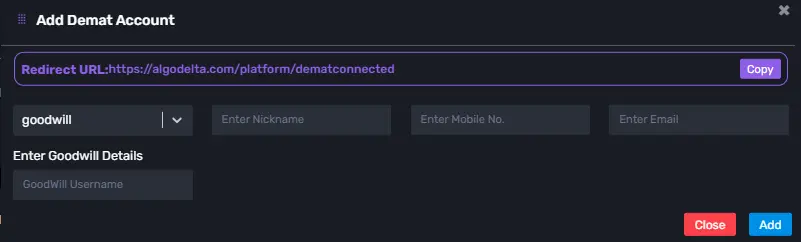
Step 2:
- After clicking “Add,” you’ll be redirected to the GoodWill login portal to continue.
- Enter your GoodWill login details — Client ID, password, and OTP/TOTP — to continue.
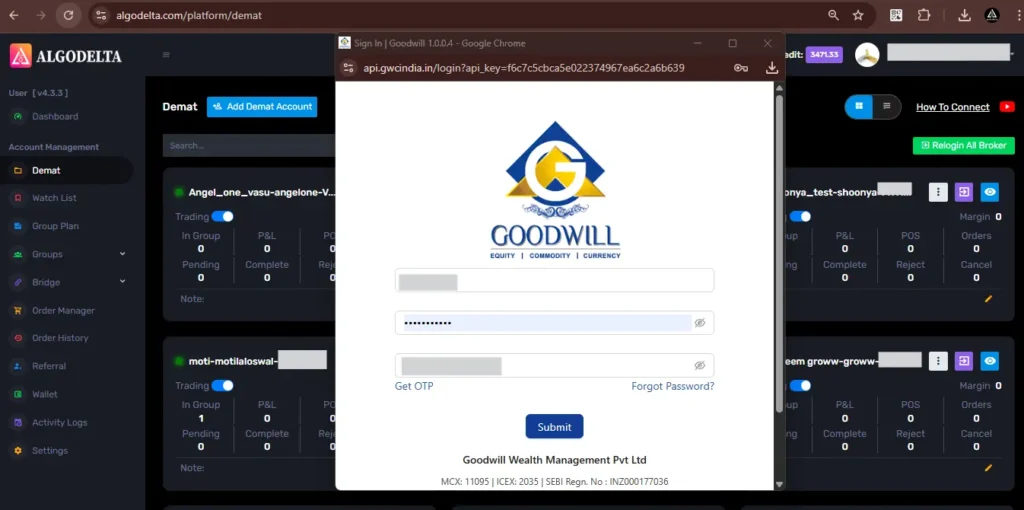
GoodWill account integration is complete — you’re ready to start trading.
Don’t have an AlgoDelta account yet? Register here: https://algodelta.com/platform/register

Written by
The AlgoDelta support team writes setup guides for copy trading, broker API connections and TradingView automation, based on thousands of real customer setups.